• Getting Started
    • How to Sign Up for Counto
    • Understanding Your Client Portal
  • Software Help
    • BillPay
    • CorpSec
    • Payroll
  • Service Support
  • Getting Started
    • How to Sign Up for Counto
    • Understanding Your Client Portal
  • Software Help
    • BillPay
    • CorpSec
    • Payroll
  • Service Support
Home/Knowledge Base/Payroll Services/How to Activate Payroll System

How to Activate Payroll System

10 views 0 November 4, 2025 helpmycounto-com

How to Activate Payroll System

Steps

  1. Login to dashboard.xion.ai
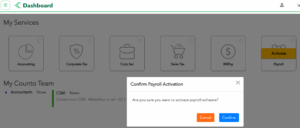
  2. Click on Activate at Payroll icon

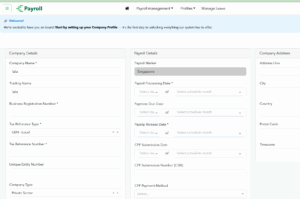
3. Fill up the Company Details in the Profile and click update
 

Video Reference  : https://www.youtube.com/watch?v=xjOLZzVSQTQ

END of Article


Was this helpful?

Yes  No
Related Articles
  • How to Apply for CPF Submission Number (CSN)
  • Applying for CPF Direct Debit (GIRO)
  • Emp portal

No luck finding what you need? Contact Us

  How to Apply for CPF Submission Number (CSN)

  • Copyright 2025 SmartWpThemes.com. All Rights Reserved.